
Introduction
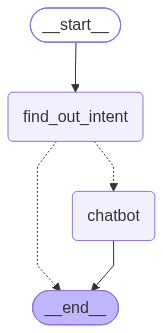
In the previous article, we extended our chatbot with intent classification and conditional routing.Our chatbot can now determine whether a user's question is related to Hiwa AI before deciding whether it should continue processing the request.
The graph looks like this:
However, our chatbot still has an important limitation.
It can determine whether a question is related to Hiwa AI, but the language model itself does not necessarily know anything about the company's current website.For example, a user might ask:
What services does Hiwa AI provide?
The model cannot be expected to know the answer simply because the information exists on the company's website.
We could put all of the website's content inside the system prompt, but that approach does not scale. A website can contain hundreds or thousands of pages, and sending all of that information to the model for every question would be extremely inefficient.Instead, we need a way to retrieve only the information that is relevant to the user's question.
This is where Retrieval-Augmented Generation (RAG) comes in.
What Is RAG?
RAG stands for Retrieval-Augmented Generation.
The basic idea is simple:
- Store information in a searchable knowledge base.
- Search the knowledge base when the user asks a question.
- Retrieve the most relevant information.
- Give that information to the language model.
- Let the model generate an answer using the retrieved context.
Instead of this:
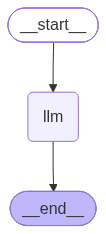
we introduce a retrieval step:
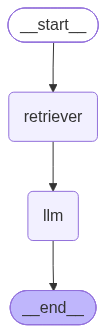
The language model is still responsible for generating the answer, but the information used to generate that answer comes from our own knowledge base.This is especially useful when working with local models because we don't need to train the model on the website's content.
Step 1: Collecting the Website Content
Before we can search the website, we need to extract its content.A website contains many different types of information:
- Text
- Navigation menus
- Headers and footers
- Images
- Links
- HTML elements
- Metadata
For our chatbot, we are primarily interested in the meaningful textual content.A simple crawler might retrieve a webpage like this:
import requests
from bs4 import BeautifulSoup
def extract_text(url: str) -> str:
  response = requests.get(url)
  response.raise_for_status()

  soup = BeautifulSoup(response.text, "html.parser")

  for element in soup(["script", "style", "nav", "footer"]):
   element.decompose()
  return soup.get_text(" ", strip=True)
This function downloads the page, removes elements that are not useful for our knowledge base, and returns the remaining text.For a real website, however, we usually need a more sophisticated crawler.
We may need to:
- Discover multiple pages.
- Follow links.
- Read the sitemap.
- Avoid crawling the same page multiple times.
- Handle dynamically generated content.
- Store the URL associated with each document.
The important idea is that RAG starts before the chatbot itself.We first need to build the knowledge that the chatbot will eventually search.
Step 2: Splitting the Content Into Chunks
A webpage can contain a large amount of text. We generally don't want to store an entire webpage as one giant document. Instead, we divide the content into smaller pieces called chunks. For example, imagine a page contains:
- Hiwa AI provides several AI-powered services.
- The platform allows businesses to automate different workflows.
- Users can also integrate AI capabilities into their existing applications.
- Hiwa AI provides tools for document processing and intelligent assistants.
Instead of treating the entire page as one document, we can split it into smaller sections:
- Chunk 1: Hiwa AI provides several AI-powered services.
- Chunk 2: The platform allows businesses to automate different workflows.
- Chunk 3: Users can also integrate AI capabilities into their existing applications.
- Chunk 4: Hiwa AI provides tools for document processing and intelligent assistants.
This makes retrieval much more precise.If the user asks:
What can businesses automate?
we want to retrieve the chunk discussing workflow automation rather than the entire website page.
Step 3: Creating Embeddings
Now we have chunks of text, but we still need a way to search them based on their meaning.This is where embeddings are useful. An embedding model converts text into a list of numbers called a vector. For example:
"What services does Hiwa AI provide?"
might be converted into something conceptually similar to:
[0.12, -0.43, 0.87, 0.21, ...]
The actual vector is much larger than this example. The important idea is that semantically similar pieces of text tend to have similar vectors. For example:
"What services does Hiwa AI provide?"
and
"Hiwa AI offers AI-powered services for businesses."
are different sentences, but they have a similar meaning. Their embeddings should therefore be relatively close to each other in vector space. We can generate an embedding using an embedding model:
from openai import OpenAI
client = OpenAI( api_key="YOUR_API_KEY" )
def embed_text(text: str) -> list[float]:
  response = client.embeddings.create( model="BAAI/bge-m3", input=text, )
return response.data[0].embedding
The exact embedding model is not important for understanding the architecture. The important part is that the same embedding model should be used when storing documents and when searching for them.
Step 4: Storing the Chunks
Each chunk needs to be stored together with its embedding. A simple database record might look like this:
| id | text | embedding | url |
|---|---|---|---|
| 42 | Hiwa AI provides AI-powered tools for businesses. | [0.12, -0.43, 0.87, ...] | "https://hiwaai.com/services" |
The text is important because this is what we will eventually give to the language model. The embedding is important because this is what we use to find relevant text. The URL is useful for tracking where the information came from and can later be used to provide citations to the user.
Step 5: Searching the Knowledge Base
Now we have everything necessary to perform retrieval. Suppose the user asks:
What services does Hiwa AI provide?
First, we create an embedding for the question.
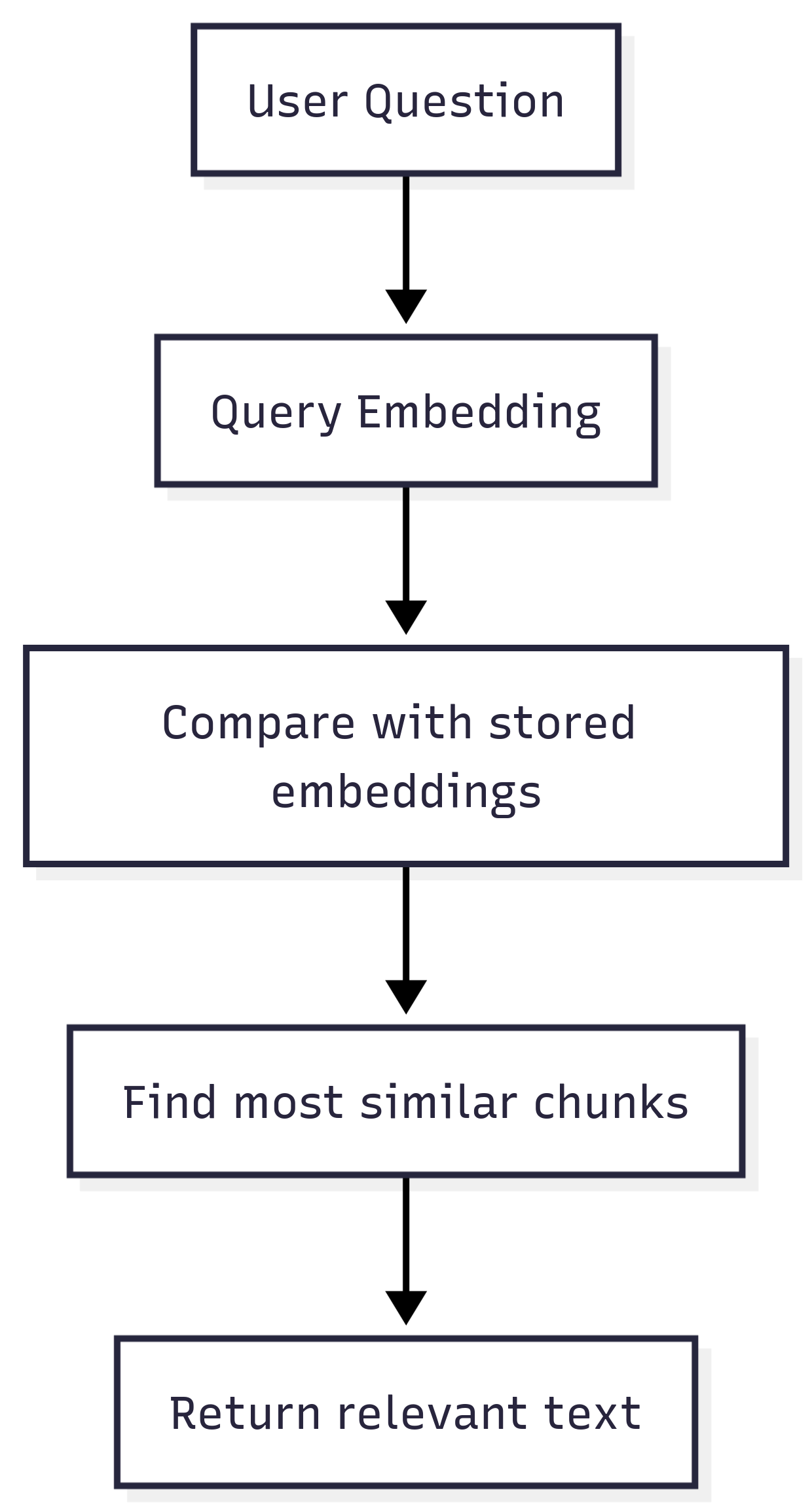
query_embedding = embed_text( "What services does Hiwa AI provide?")We now have a vector representing the user's question. Next, we compare this vector with the vectors stored in our database. Conceptually, the process looks like this:
User Question │ ▼ Query Embedding │ ▼ Compare with stored embeddings │ ▼ Find most similar chunks │ ▼ Return relevant text
The similarity calculation can use different distance metrics. One commonly used metric is cosine similarity. The result might look like:
[
  {"text": "Hiwa AI provides AI-powered tools for businesses.",
  "score": 0.91 },
  {"text": "The platform provides intelligent document processing.",
  "score": 0.87 },
  {"text": "Businesses can integrate AI assistants into their workflows.",
  "score": 0.82 } ]
The highest-scoring chunks are the ones we consider most relevant to the user's question.
Step 6: Giving the Retrieved Information to the LLM
At this point, we have the information the model needs. We can combine the retrieved chunks with the user's question. For example:
context = "\n\n".join( chunk["text"] for chunk in retrieved_chunks ) Then we construct a prompt:
prompt = f""" You are an assistant for Hiwa AI. Answer the user's question using the provided context. Context: {context} Question: {user_question} """We can now send this prompt to our language model:
response = llm.invoke(prompt) print(response.content) The important thing to notice is that the model does not need to know the website beforehand. We provide the relevant information at inference time. This is the fundamental idea behind Retrieval-Augmented Generation.
Putting the Retrieval Pipeline Together
We can now combine the individual steps into a simple retrieval function:
def retrieve_documents( query: str, top_k: int = 3,):
  query_embedding = embed_text(query)
  results = search_similar_chunks(query_embedding=query_embedding, top_k=top_k,)
return results
Then the chatbot can use it like this:
user_question = "What services does Hiwa AI provide?"
documents = retrieve_documents(user_question)
context = "\n\n".join( document["text"] for document in documents )
prompt = f""" You are an assistant for Hiwa AI. Use the following context to answer the question. Context: {context} Question: {user_question} """
response = llm.invoke(prompt)
print(response.content)
The overall workflow is now:
Connecting This to Our LangGraph
At this point, we have two separate pieces. From the previous article, we have our intent classification and conditional routing, Now we have a retrieval pipeline. The next step is to combine these two ideas. Instead of sending a related question directly to the chatbot, we can route it through a retrieval node first:
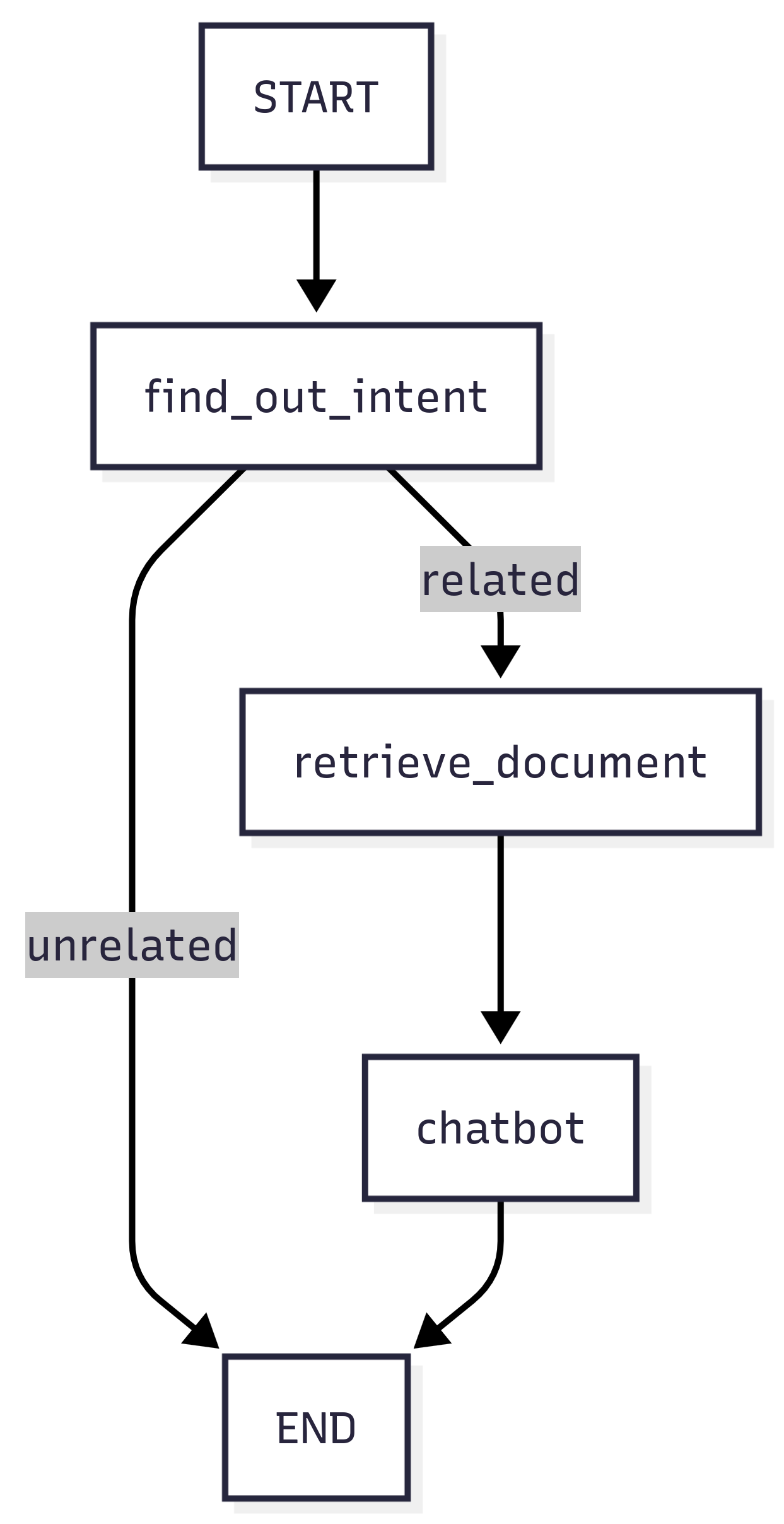
Now the chatbot has all three important components:
- It can understand the user's intent.
- It can retrieve relevant information.
- It can generate an answer using that information.
In the next article, we'll combine the retrieval pipeline with our LangGraph workflow and build the complete RAG chatbot.
Conclusion
A language model by itself is not always enough to build a useful application.When we need a chatbot to answer questions about a specific and changing source of information, we need a way to provide that knowledge to the model.
RAG solves this problem by separating knowledge retrieval from answer generation.The process is straightforward:
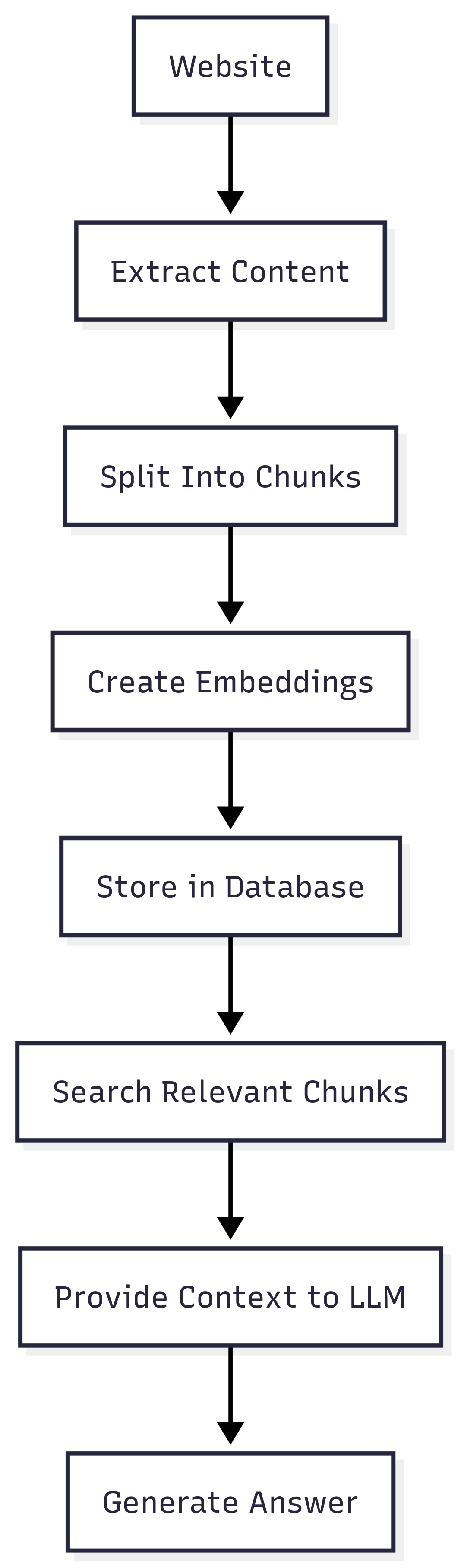
The important part is that we don't need to retrain our language model whenever the website changes. We can simply update the knowledge base.This makes RAG a practical approach for building AI applications that need to work with private, domain-specific, or frequently changing information.