
Introduction
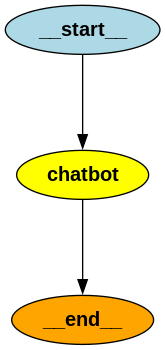
In the previous article, we built our first chatbot using LangGraph. The graph was intentionally simple:
START → Chatbot → END
Every message followed exactly the same path. Regardless of what the user asked, the chatbot always sent the conversation directly to the language model. While this is a great starting point, real-world AI applications rarely behave this way. Imagine we're building a chatbot for Hiwa AI.
Some questions are related to the company:
- What services does Hiwa AI provide?
- Where is Hiwa AI located?
- How can I contact Hiwa AI?
Other questions have nothing to do with the company:
- Who won the World Cup?
- Tell me a joke.
- What's the weather today?
Ideally, our chatbot should recognize the user's intent before deciding what to do next.
In this article, we'll extend our chatbot with two important LangGraph concepts:
- Intent Classification — determining what the user is asking about.
- Conditional Routing — choosing a different execution path based on that intent.
Although we'll keep the graph relatively small, these two concepts are the foundation of many production AI systems.
Understanding Intent Classification
Intent classification is the process of identifying what the user is trying to accomplish. Instead of immediately generating an answer, the chatbot first analyzes the user's message and assigns it to a category. For our chatbot we'll use only two categories:
- related – questions about Hiwa AI.
- unrelated – everything else.
For example:
User: Question, Intent:
- What products does Hiwa AI offer?: related,
- Where is Hiwa AI located?: related,START → Chatbot → END
- Tell me a joke.: unrelated
- Who invented Python?: unrelated
Instead of trying to answer every question, our chatbot first decides which category the question belongs to.This extra step allows the graph to make smarter decisions later.
Understanding Conditional Routing
In the previous article, execution always followed the same path.There was no decision-making.Conditional routing changes this.Instead of always executing the next node, LangGraph can inspect the current state and decide where execution should continue.
Our new graph looks like this:
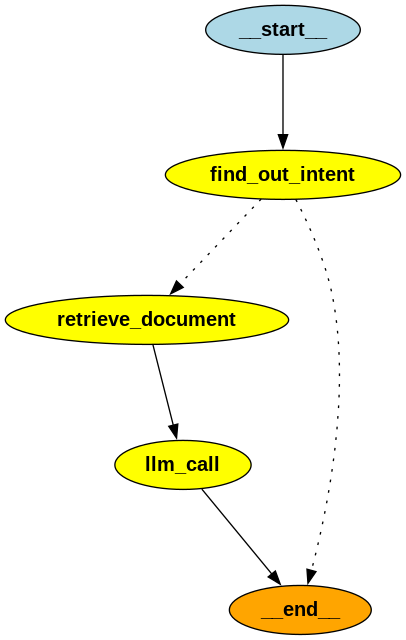
Notice that there are now two possible execution paths.The path the graph follows depends entirely on the result of the intent classification.
Step 1: Expanding the State
Our first chatbot only needed to remember the conversation history.Now we also need to remember the user's intent.
from typing import Literal
from langgraph.graph import MessagesState
class State(MessagesState):
user_intent: Literal["related", "unrelated"]
Instead of creating a completely new state, we inherit from MessagesState.MessagesState already contains everything needed to store the conversation history.We simply extend it with another field called user_intent.Later, our graph will use this value to decide which node should execute next.
Step 2: Defining a Structured Response
The language model needs to classify the user's message.Instead of asking the model to return plain text, we'll ask it to return a structured object.
from typing import Literal
from pydantic import BaseModel
class UserIntent(BaseModel):
  user_intent: Literal["related", "unrelated"]
reasoning: str
Next, we tell the language model to always return this structure.
structured_llm = llm.with_structured_output(UserIntent)Now, instead of generating something like this:
I think this question is related to Hiwa AI because...
the model returns an object like:
UserIntent(
  user_intent="related",
  reasoning="The user is asking about the company's services."
)
This approach is much easier to work with because our application receives structured data instead of free-form text.
Step 3: Creating the Intent Classification Node
Now we can create our first node.
from langchain_core.messages import SystemMessage
INTENT_SYSTEM = """ Determine whether the user's question is related to Hiwa AI. Return: - related - unrelated """
The node itself is very small.
def find_out_intent(state: State):
  result = structured_llm.invoke(
  [SystemMessage(content=INTENT_SYSTEM)] + state["messages"]
  )
return { "user_intent": result.user_intent }
The node receives the conversation history.It asks the language model to classify the latest user message.Finally, it stores the classification inside the graph's state.Notice that this node does not answer the user's question.Its only responsibility is determining the user's intent.Keeping each node focused on a single task makes the graph easier to understand and maintain.
Step 4: Making a Decision
Now that the graph knows the user's intent, it can decide what to do next.This decision is made by a normal Python function.
from typing import Literal
from langgraph.graph import END
def should_continue( state: State,) -> Literal["chatbot", END]:
  if state["user_intent"] == "related":
    return "chatbot"
return END
If the question is related to Hiwa AI, the graph continues to the chatbot node.Otherwise, execution ends immediately.This function is called a routing function because its only job is deciding which node should run next.
Step 5: Creating the Chatbot Node
Our chatbot node is almost identical to the one from the previous article.
def chatbot(state: State):
  response = llm.invoke(state["messages"])
  return {"messages": [response]}
The only difference is that this node is no longer executed for every user message.It only runs if the routing function determines that the question is related to Hiwa AI.
Step 6: Building the Graph
Finally, we connect everything together.
from langgraph.graph import StateGraph, START, END

builder = StateGraph(State)

builder.add_node("find_out_intent", find_out_intent)
builder.add_node("chatbot", chatbot)

builder.add_edge(START, "find_out_intent")
builder.add_conditional_edges("find_out_intent", should_continue, ["chatbot", END])
builder.add_edge("chatbot", END)

graph = builder.compile()
Most of this code should look familiar from the previous article.
The only new concept is:
from langgraph.graph import StateGraph, START, END

builder = StateGraph(State)

builder.add_node("find_out_intent", find_out_intent)
builder.add_node("chatbot", chatbot)

builder.add_edge(START, "find_out_intent")
builder.add_conditional_edges(
    "find_out_intent",
    should_continue,
    ["chatbot", END]
)
builder.add_edge("chatbot", END)

graph = builder.compile()


def chatbot(state: State):
    response = llm.invoke(state["messages"])
    return {"messages": [response]}
The only difference is that this node is no longer executed for every user message.It only runs if the routing function determines that the question is related to Hiwa AI.
Step 6: Building the Graph
Finally, we connect everything together.
from langgraph.graph import StateGraph, START, END

builder = StateGraph(State)

builder.add_node("find_out_intent", find_out_intent)
builder.add_node("chatbot", chatbot)

builder.add_edge(START, "find_out_intent")
builder.add_conditional_edges("find_out_intent", should_continue, ["chatbot", END])
builder.add_edge("chatbot", END)

graph = builder.compile()
Most of this code should look familiar from the previous article.The only new concept is:
builder.add_conditional_edges( "find_out_intent", should_continue, ["chatbot", END])Instead of always connecting one node directly to another, we're telling LangGraph to execute the should_continue() function.Whatever value that function returns determines which edge the graph follows.
This is one of the features that makes LangGraph so powerful.Instead of writing nested if statements throughout your application, you model your decision-making process directly as a graph.
As your application grows, you simply add more nodes and more routing logic while keeping each component small and focused.
What's Next?
Our chatbot can now make decisions before generating a response.However, it still has one major limitation.
Even when a question is related to Hiwa AI, the language model has no knowledge of the company's website.
In the next article, we'll solve this problem by introducing Retrieval-Augmented Generation (RAG). We'll build a knowledge base from the Hiwa AI website, retrieve the most relevant information for each question, and provide that context to the language model before it generates its response.